
Build your own player on SHARE

SHARE is a protocol for decentralized music and video distribution on blockchain. You can build your own music apps on SHARE and save time by leveraging existing payments tech, onchain smart contracts and user interface software. For in depth background please review the SHARE whitepaper: https://formless-eng.s3.us-east-2.amazonaws.com/share+whitepaper+7.pdf A working open source player that you can copy, modify and fork for your own applications under the MIT license is available here: https://github.com/formless-eng/share-v1-player Working Player Screenshot Live player: https://share-v1-player.vercel.app/assets/base/0x4754FE39AFAE67F886088774A047607CC6CFA693 The documentation below is intended to help you understand how the player works.
PFA Smart Contracts

The primary building blocks of SHARE are Pay-For-Access (PFA) smart contracts. Every smart contract has an address and a network ID. On share.stream, this looks like https://share.stream/assets/base/0x4754FE39AFAE67F886088774A047607CC6CFA693, where base is the name of network 8453 (Coinbase) and 0x4754FE39AFAE67F886088774A047607CC6CFA693 is the PFA contract address. In all examples, the network ID is 8453, which is the Base blockchain. PFAs allow applications to retrieve the following information for a given piece of content:
{
  artist: string;
  collection: string[];
  type: string;
  title: string;
  video_hls: string;
  video: string;
  audio: string;
  image: string;
};
To obtain this information, an application calls the tokenURI function of the PFA on the blockchain, which returns a SHARE decentralized distribution network (DDN) endpoint mapping to the content, such as: https://share-ddn-micro.formless.xyz/v1?contractAddress=0x8E77F3070A0973386AF4F4D1C38C3502DD811388&networkId=8453 For example, this endpoint returns the following:
{
  "name": "Otro Nivel",
  "title": "Otro Nivel",
  "description": "Latin House",
  "artist": "Breathboi., Cazza, Zapata",
  "type": "audio",
  "image": "https://share-ddn.formless.xyz/content/b5710143-6b6d-4baa-b9b7-815bedd3feff.jpg",
  "animation_url": "https://share-ddn.formless.xyz/content/a05a935a-882a-4d60-9a84-cc709fb63e0e.wav",
  "audio": "https://share-ddn.formless.xyz/content/a05a935a-882a-4d60-9a84-cc709fb63e0e.wav",
  "license_type": "APPLICATION_LICENSE_V1",
  "supports_licensing": true
}
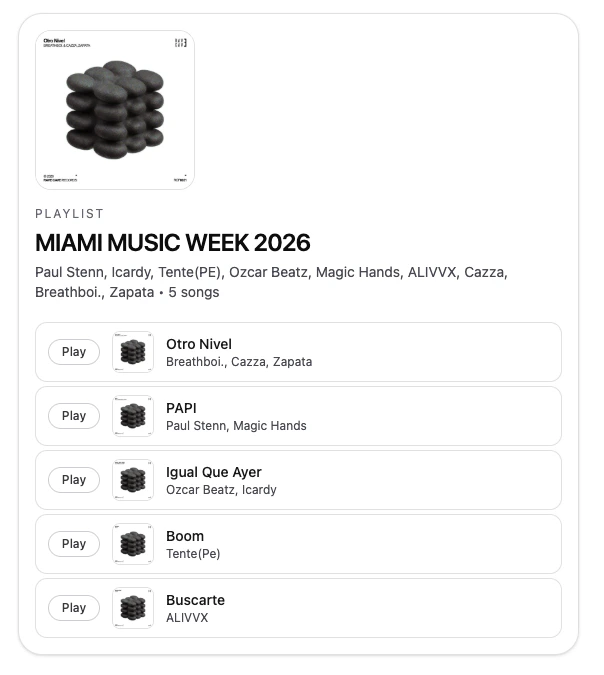
Which enables you to display it in your app and play the content, like this: https://share-v1-player.vercel.app/assets/base/0x4754FE39AFAE67F886088774A047607CC6CFA693 Notice that by default the information returned above is a preview. In your application, if a user has paid for access to the content, then you can append a signature to your request and SHARE will return the full content, rather than a preview. Any content uploaded using https://share.stream can be accessed in this way from any other application simply using the contract address and network ID of the content, e.g. the share.stream link to the example above is: https://share.stream/assets/base/0x4754FE39AFAE67F886088774A047607CC6CFA693 Here’s an example of the information returned for a playlist on SHARE protocol:
{
  "name": "MIAMI MUSIC WEEK 2026",
  "title": "MIAMI MUSIC WEEK 2026",
  "description": "RAVE CAVE RECORDS V.A",
  "artist": "Paul Stenn, Icardy, Tente(PE), Ozcar Beatz, Magic Hands, ALIVVX, Cazza, Breathboi., Zapata",
  "type": "collection",
  "image": "https://share-ddn.formless.xyz/content/b5710143-6b6d-4baa-b9b7-815bedd3feff.jpg",
  "collection": [
    "https://share-ddn-micro.formless.xyz/v1?networkId=8453&contractAddress=0x8E77f3070a0973386Af4F4d1c38c3502dD811388&collectionAddress=0x4754fe39AFae67F886088774a047607CC6CfA693",
    "https://share-ddn-micro.formless.xyz/v1?networkId=8453&contractAddress=0x62B243F3379b67aD85D08955B0F806d042cf9eA1&collectionAddress=0x4754fe39AFae67F886088774a047607CC6CfA693",
    "https://share-ddn-micro.formless.xyz/v1?networkId=8453&contractAddress=0x52C1F279dAAB06f2272a4dE2B3FA1e92da49d0AC&collectionAddress=0x4754fe39AFae67F886088774a047607CC6CfA693",
    "https://share-ddn-micro.formless.xyz/v1?networkId=8453&contractAddress=0xABdE86111FB081E4137b3e46Bba780e9Fb3a14b8&collectionAddress=0x4754fe39AFae67F886088774a047607CC6CfA693",
    "https://share-ddn-micro.formless.xyz/v1?networkId=8453&contractAddress=0x76CB1cdcfB0293C01F52274A0345Eb3fc47D4a22&collectionAddress=0x4754fe39AFae67F886088774a047607CC6CfA693"
  ],
  "license_type": "APPLICATION_LICENSE_V1",
  "supports_licensing": false
}
When a user pays for access to a PFA Collection smart contract, they get access to all items within the playlist (URLs listed in the collection array) automatically. The following sections cover how to build a player app using the PFA building block.

Wallets and Balances

This guide uses the Privy wallet, which is owned by Stripe and recommended when building your applications on SHARE. Once your Privy project is set up, import Privy into your application to easily enable users to fund their digital wallets with Apple Pay, Google Pay, Credit Card, or Crypto (USDC stablecoins), to check their balances, and to make payments for PFAs. Payments on SHARE are done using USDC which is a stablecoin mapping to a digital dollar. All payments and splits are handled onchain for all stakeholders of a given piece of content. Your app does not need to handle that infrastructure. Uploads, payment splits, withdrawals etc. are handled by SHARE and artists have access to these capabilities in the main share.stream/dashboard dashboard. For your consumer facing player, you only need the PFA contract address to serve content to users. If you’d like to build a marketplace application, you can maintain your own database of PFA contract addresses. Here’s an example of reading a user’s USDC balance using Viem and a Privy wallet.
const usdcTokenAddress = "0x833589fCD6eDb6E08f4c7C32D4f71b54bdA02913";

const balance = await publicClient.readContract({
  address: usdcTokenAddress,
  abi: erc20Abi,
  functionName: "balanceOf",
  args: [getAddress(client.account.address as Hex)],
});

Adding funds (USDC) to a user’s digital wallet

const { fundWallet } = useFundWallet();

await fundWallet({
  address: client.account.address,
  options: {
    chain: SUPPORTED_CHAINS.base,
    amount: formatUnits(priceQuery.data, 6),
    asset: "USDC" as const,
    uiConfig: { receiveFundsTitle: "Transfer USDC (crypto) to your wallet" },
  },
});

Getting the price of a PFA asset

SHARE Protocol is a smart contract on the Base blockchain at address 0x3Fb4b0b61ADB6d33EE901690E2C87B413c30968b. To get the price of a PFA asset, we make a grossPricePerAccess function call on the SHARE protocol contract and supply the PFA contract address. The returned price is in USDC.
const price = await publicClient.readContract({
  address: getAddress(SHARE_PROTOCOL_ADDRESS as Hex),
  abi: shareContractAbi,
  functionName: "grossPricePerAccess",
  args: [getAddress(contractAddress as Hex), BigInt(0)],
});

Purchasing access to a PFA

Purchasing access is done by calling a smart contract access function directly on the PFA. Note that this is fundamentally different from NFTs. In the case of NFTs, users are buying and selling an NFT itself. In SHARE, the PFA smart contract remains with the owner. Only a function call is being performed, and that function call routes payment to the rightful owners, enabling a consumer to obtain the content. There is no NFT exchanged in a content purchase. If the PFA were purchased in its entirety, it would be equivalent to a transfer of ownership of the entire PFA, not a purchase of access to its underlying content.
const hash = await client.sendTransaction({
  calls: [
    {
      to: usdcTokenAddress,
      data: encodeFunctionData({
        abi: erc20Abi,
        functionName: "approve",
        args: [SHARE_PROTOCOL_ADDRESS as Hex, priceQuery.data],
      }),
    },
    {
      to: SHARE_PROTOCOL_ADDRESS as Hex,
      data: encodeFunctionData({
        abi: shareContractAbi,
        functionName: "access",
        args: [
          getAddress(contractAddress as Hex),
          BigInt(0),
          getAddress(client.account.address as Hex),
        ],
      }),
    },
  ],
});

Getting the token URI from the PFA

PFAs adhere to the ERC721 standard meaning all PFAs have a tokenURI function. This function is what can be called on the blockchain to obtain the example URL above (eg. https://share-ddn-micro.formless.xyz/v1?contractAddress=0x8E77F3070A0973386AF4F4D1C38C3502DD811388&networkId=8453 is the tokenURI for contract address 0x8E77F3070A0973386AF4F4D1C38C3502DD811388 on Base). The token URI can be requested over HTTP to get the content metadata (title, image, audio, video etc).
const tokenURI = await publicClient.readContract({
  address: getAddress(contractAddress as Hex),
  abi: erc721Abi,
  functionName: "tokenURI",
  args: [BigInt(0)],
});
Note that only the 0 index is ever used when calling tokenURI on SHARE PFA smart contracts.

Authenticating Token URI Requests

Once a PFAs tokenURI is obtained, a signed message must be appended to it in order to access paid content. The signed message is always the signed string below. Signing can be done using Privy’s built in smart wallet signMessage capability.
export const SERVER_AUTH_MESSAGE =
  "Signing this message verifies your wallet address and authenticates the use of Share application services." as const;

const nextSignature = await client?.signMessage(
  { message: SERVER_AUTH_MESSAGE },
  { uiOptions: { showWalletUIs: false } },
);

Preparing a signed token URI

The example code below shows how a signature should be appended to a tokenURI to form the final authenticated URL. Example code: https://github.com/formless-eng/share-v1-player/blob/ad53956e90a272df4f0534a9c3fef9ab952dfa36/app/lib/utils.ts#L30

Getting Paid Content from Token URI with a Signature

Once a signature is obtained, fetching the tokenURI with the signature appended will return the premium version of the content which has been paid for by the user who is authenticated by the signature. This is what enables you to serve content that has been purchased on SHARE to consumers in your own application.
const response = await fetch(
  makeSignedTokenURI({
    tokenURI: tokenURI as string,
    contractAddress: contractAddress,
    networkId: networkId,
    walletAddress: client?.account?.address,
    signature,
  }),
);

Working Reference Implementation

https://github.com/formless-eng/share-v1-player